The Project panel — what is in force
The Project panel, in the left (Context) column, states the active project, audit log, paired topology, configured processors and source roots, plus saved charts, reports and analyses. It shows what is available even before a log is opened.
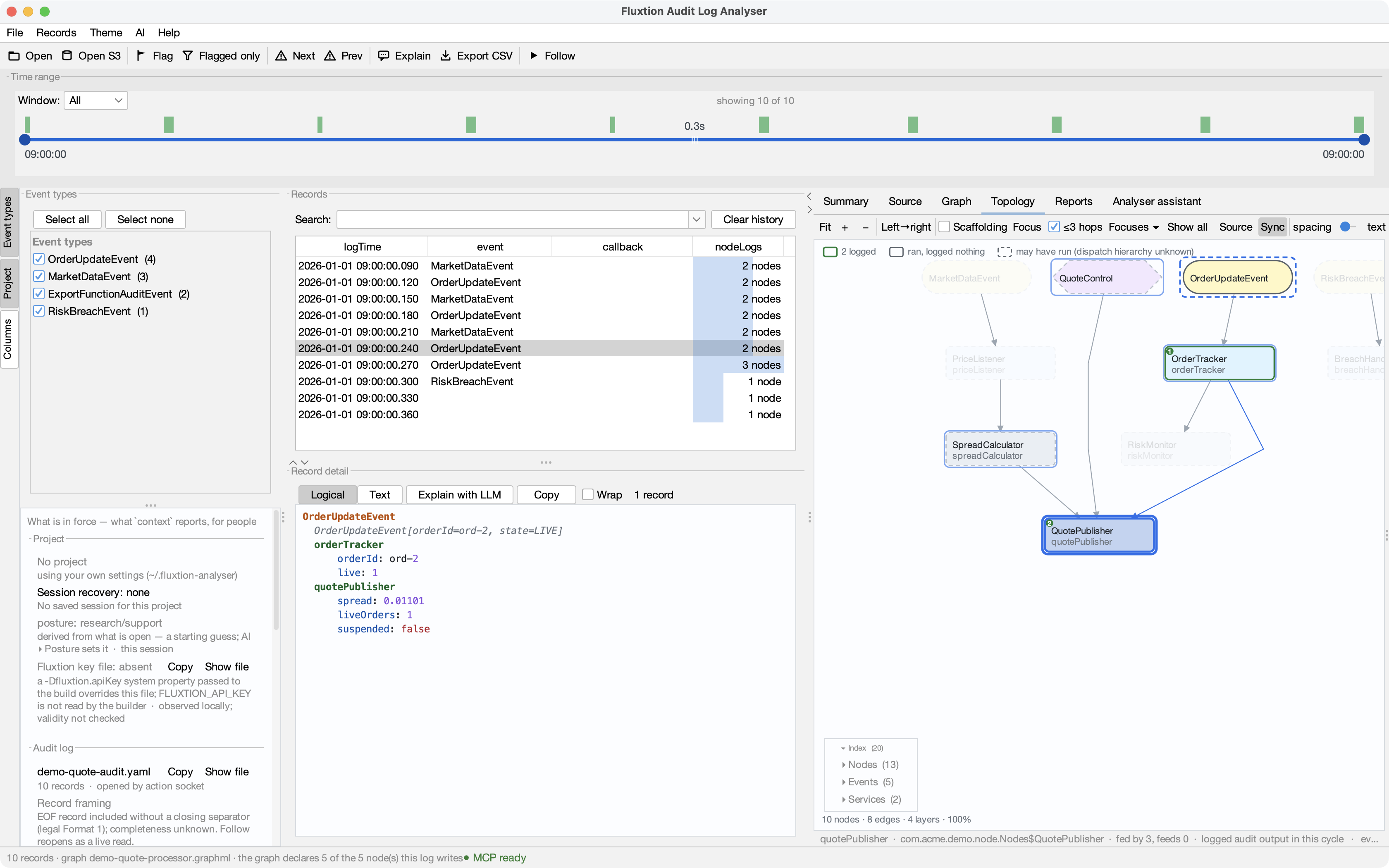
What each section says
| Section | Row | Where it came from (the right-hand column) |
|---|---|---|
| Project | the profile's name and directory; Copy / Show file the settings file; one row per runbook pointer (with the one-line description it declares, if any) and one for the vocabulary file — Open reads the file here, read-only (warning if missing); add or remove these from AI ▸ Runbooks… — the panel states what is in force, the AI menu changes it; one per declared environment (a warning when its logDir is not there, naming the project root tried) — see Portable context |
project settings in force — or No project — using your own settings |
| Audit log | the file you opened, as you named it (s3://… stays s3://…), records |
opened by you / opened by the action socket, the system it came from, and who said so — declared by the opener, or the project environment that supplied it |
| Graph | the graphml, and the pairing verdict: applies — 5/5 logged nodes declared, or a warning that it does not fit this log. Above it, if the processor was built without audit logging: ⚠ audit logging NOT installed — this processor writes no audit log at all, which outranks the pairing because pairing a log that will never exist is a question about nothing | opened by you, or supplied by the reader (declared / INFERRED); when two graphs were in play, which one won and why |
| Event processors | every configured class, the selected one marked, and whether its source was found under a root — Open opens it in the Source tab; when it was not found there is no Open, and Add source opens Settings ▸ Source roots. A processor the project declares and that is also found is one row: the declaration rides in the provenance column (… · project declaration · declared), quoting each declared name the row does not already show, so two declarations of one class keep both names; a declaration naming no class — a runtime processor — keeps a row of its own | project / own settings / discovered under a root |
| Source roots | each root with its stored form — project-relative, workspace-relative, ~, absolute; under a project, absolute and ~ are a warning that the profile will not resolve on a colleague's machine — and the workspace anchor if declared. A root inside the project is named by its path in the project (vendor/integrator/src/main/java), and roots that would otherwise read alike keep more of their path until they differ; Copy and the tooltip always give the full path |
project / own settings / demo (transient) |
| Saved charts | named chart definitions, including those waiting for input; an open chart still needs its data bindings checked | saved / open |
| Analyses | each saved analysis — its rationale, step count and the parameters it needs; recall is Project ▸ Run analysis or open {analysis} — the panel only states the offer |
project |
| Reports | where files leave — the assistant's exchange directory, or File exchange off with where to turn it on — each saved report by title with its section count, and each publish destination (publish to bucket: s3://… · s3) the project declares — a directory that is not there is a warning; a remote place says it is not checked | the directory is own settings, or project when the open project supplied it (the permission is always your own settings, never shared); reports are project |
An empty section is a sentence, not a blank — "No graph — Sources ▸ Open GraphML…, or a reader may supply one with its log" — so you never have to go elsewhere to learn why it is empty.
What it will and will not do
Every button on the panel reveals or navigates: Copy the full path, Show file in the file
manager, Open the thing in its tab (Topology, Source, Reports) or — for a runbook or the glossary — in a
read-only viewer, Settings… for roots, processors and the exchange directory, Add source when a
processor's source was not found. Nothing on it closes, switches, edits or runs — those stay in the File
menu and Settings, so the panel is a display you can trust. (Running anything of a project's own — a folder's
Claude Code hooks and .mcp.json servers — happens only when you press Start with full Claude Code turned on, after
a confirmation that names them; see the assistant guide.)
Paths are drawn abbreviated (~/…/build/x.graphml); the full value is the tooltip and what Copy
copies. That keeps the column readable, and it keeps an incidental screenshot from carrying every path
on your machine.
It is context, for people
The panel is built from the same payload the assistant's context verb returns — it reads nothing
else. So when you and an agent connected over MCP look at the same session, you are reading the same
facts, and a fact the panel lacks is added to context first. The keys it draws are project
(name, root, settings), log (openedFrom, openedBy, records), provenance,
graphPairing (graph, graphSource, graphPath, applies, declaredByGraph, loggedNodes,
verdict, sourceGraphOffered, sourceGraphNote, auditLogging, auditLoggingNote), processors (class, selected, source,
from), source.rootTiers (path, tier, form) and source.workspaceRoot, exports (enabled,
dir, source — project or machine, since a project may supply the directory — and refused when
a project asked for one and did not get it), reports (name, title, sections, from), reportDestinations (name, location, kind,
from, problem, note), and the portable-context facts — runbooks (name, path, resolved, exists, from),
vocabulary (path, resolved, exists, from), environments (name, provenance, logDir,
default, problem) with provenanceSource, analyses (name, rationale, parameters, steps, from), and
the shared canvas's handoff — posture (value, source, setBy, derivedWouldBe; shown as Work mode in
the app) and, when one has
been placed, record (modes, resolvedFigures, authoringRequired, selectionCandidates, setBy).
The Work mode row says what this session is for — Investigate or Build. Drawn muted, it is the
analyser's guess from what is open, and says so (Work mode: Investigate — guessed from what is open; change it
in AI ▸ Work mode); drawn normally, somebody set it, and the row names who — you (AI ▸ Work mode) or an AI
client (open {posture}) — and what is open would suggest when the two disagree. The mode-selector record row appears when you or a client has placed
the authoring mode selector's output on the canvas: the modes in force, how many figures the catalogue
resolved, and what is left to author. Both rows belong to the session: a project switch clears them.
Layout
The panel and Event types share the left column in a vertical split; drag the bar between them. The whole column is draggable too — the edge between it and the records table — and both toggles on the rail hide their panel. Every one of these choices persists.
Saved charts come from context.savedGraphs (name, open, input). This is separate from
context.graphs, which lists live tabs. Neither saving a definition nor opening a tab proves that its
series exist in the current log. These are session facts, not a new report evidence section.
The project may also declare processor intent through context.processorDeclarations: a named generated
class, a runtime processor with no fixed generated class, or a type not yet specified. The Project panel
and project landing show these declarations independently of source discovery and loaded run evidence.
Opening a project with no log now shows its own declarations and saved charts on the start page, with
explicit buttons to open a log, topology, design or diagnostics. This does not run a build or application.
The Session recovery row renders context.restoration.state and message, including partial refusals.
Accept or dismiss the offer on the start page; the Project panel itself never restores files.
See session restoration for identity limits.