The assistant panel
This page covers the panel itself, and the analyser's own in-app assistant. Claude Code in the panel has its own page.
One panel, whichever assistant answers
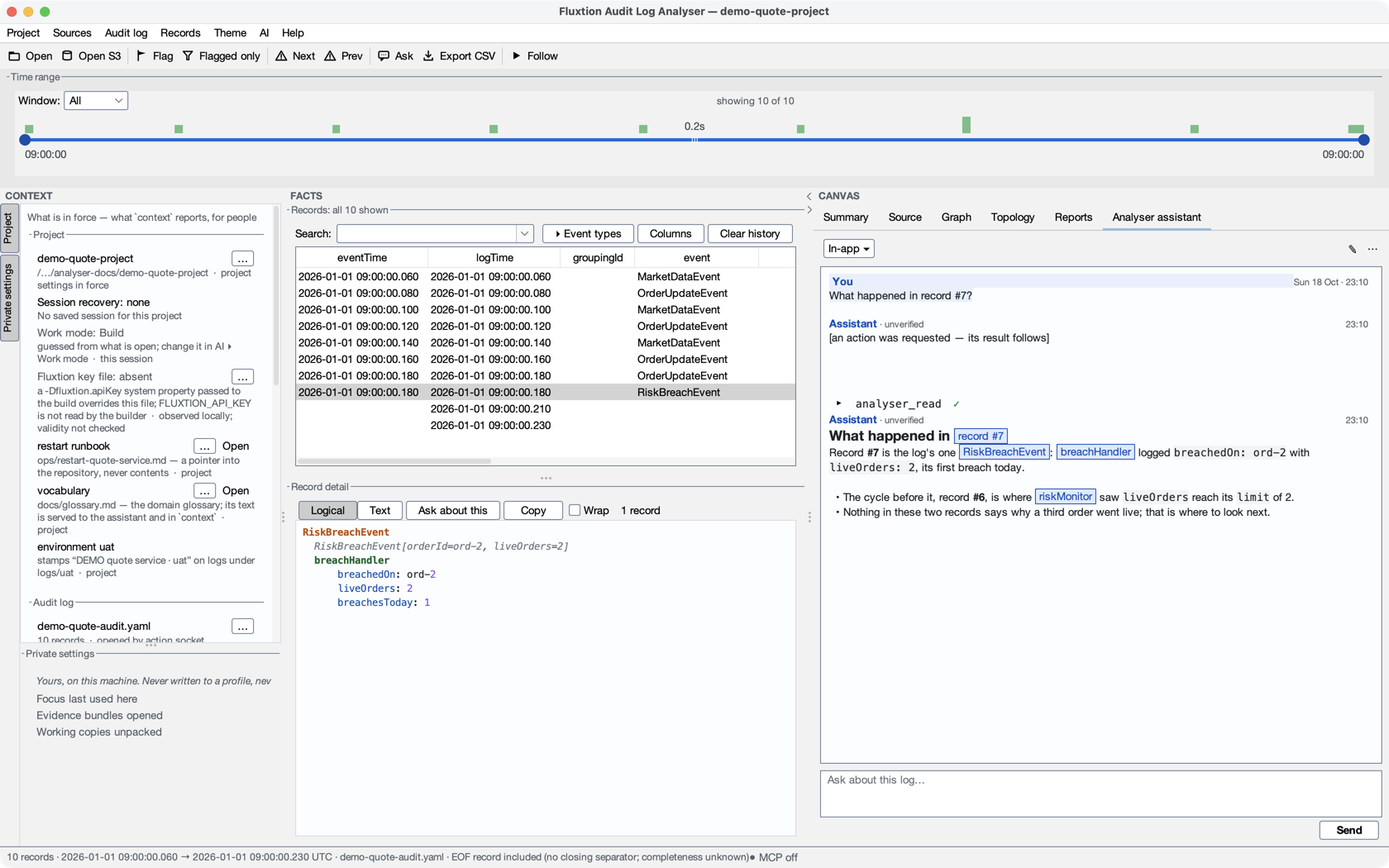
The Analyser assistant tab is one panel, whichever assistant answers in it. At its top, one mode chip names how the assistant works on this machine — Safe ▾, ◆ Full ▾, In-app ▾ or Off ▾, or Set up AI… while nothing is set up — and opens the quick switch; the profile you choose also chooses who answers: your own installed Claude Code (Claude Code in the analyser) for Safe analysis and Full Claude Code, or the analyser's own assistant with a provider you configure. How it is paid for is said once, in a note when a session is ready, and in About this session… (your Claude plan, or an API key). Both share:
- one conversation, drawn the same way: your turns as you typed them; the assistant's words as safe Markdown
(headings, lists, code blocks with light colouring, links that open only after asking you); record numbers, node ids
and chart names as small buttons that take you there; and every action as one compact tool line —
▸ analyser_readand its mark:✓,refused,denied,approved by you— that opens to show what was sent (Claude Code) or what came back (the in-app assistant); - one composer, with Send — or Stop in its place while an answer runs — doing what the mode in force does with it; it reads Ask about this log… while empty, and its tooltip has the keys; Enter sends and Shift+Enter starts a new line, as in the start page's box; ↑ on the first line recalls the questions you sent (each assistant its own), ↓ on the last line walks forward, and ↓ past the newest puts back what you were typing — as in a terminal. The history is kept in memory only: it is never saved and never sent anywhere, and it is gone when the analyser closes. Shift+↑ and Shift+↓ still select, and in a draft of several lines the arrows move the caret until it reaches the first or last line;
- one header row — the mode chip, ✎ (New chat) and ⋯, in both modes. The chip carries the state in one or two words — Safe · needs you ▾, In-app · answering… ▾, ◆ Full · stopped ▾, nothing when ready — and ◆ (◆◆ for the modes that ask least) when full Claude Code is in force. ⋯ holds New chat, Pop out, About this session…, Switch assistant… (the same quick switch), Settings… and the mode's own items: Claude Code's Start / Resume Claude Code and Set up a project with Claude…, or the in-app assistant's Copy prompt and Connect a CLI assistant…;
- one primary action. Send (in the Claude Code mode it starts Claude Code first when it is not running), or Stop in the same place while an answer or a start can be stopped. A refusal or an exit is one banner with Restart and Details (Details only when something needs attention), and a settings change Claude Code has not taken is Settings changed — restart Claude Code now? with Restart / Later;
- About this session… — the model, the profile, how it is paid for, the folder, what the profile loads, the fork warning and what this mode cannot do — the in-app assistant cannot read your project folder or use your own tools; Safe analysis has no shell, edits or web; full Claude Code's own tools are not confined by the analyser; with no key, or with the assistant Off, it says so there. It also says that no profile is local-only: what you ask, and the evidence Claude reads through the analyser, is sent to the model provider (Anthropic, on your Claude plan or API key), as in any Claude Code session — and, for the in-app assistant, to the model provider you chose.
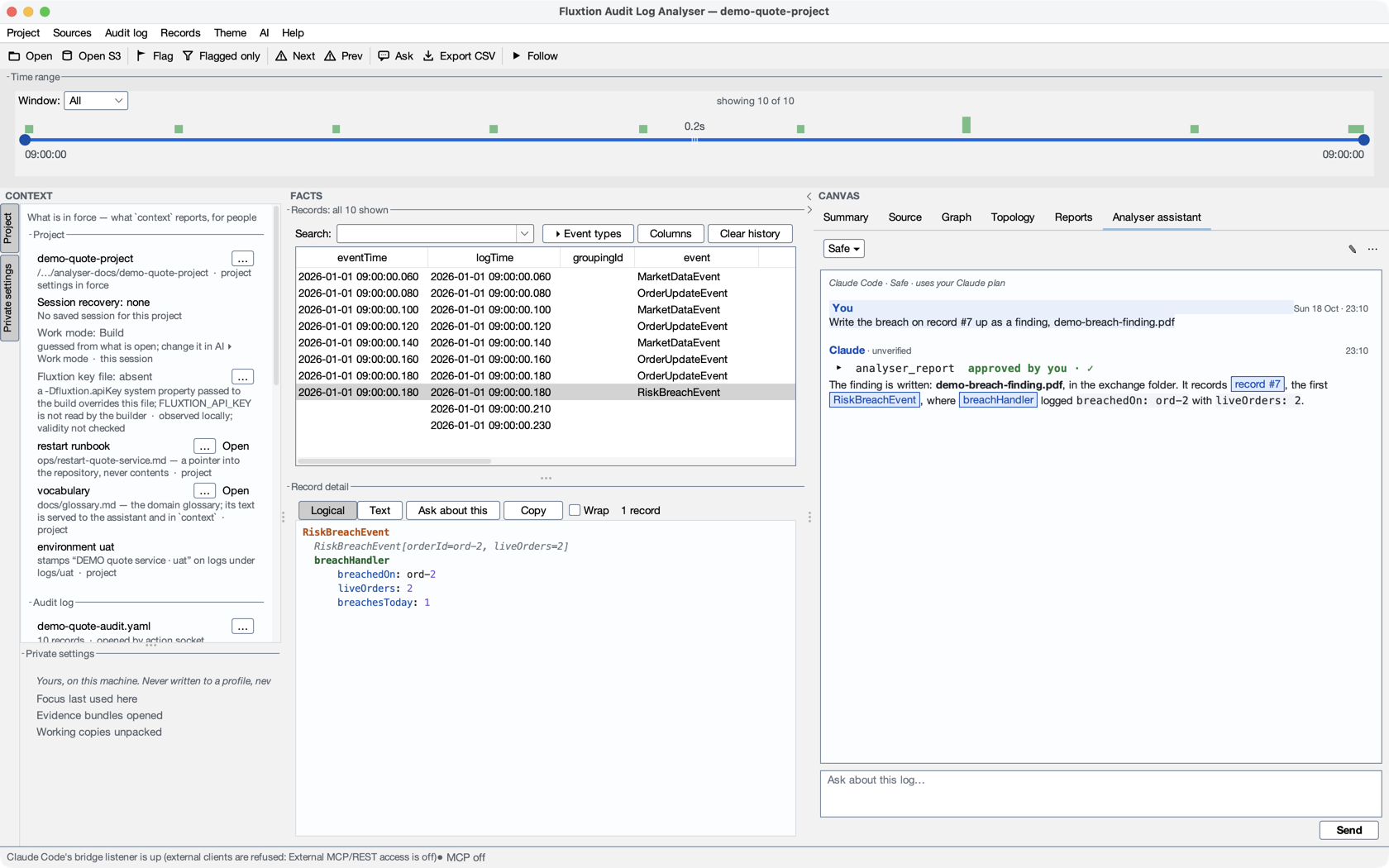
Each keeps its own rules: the in-app assistant's actions, its per-reply cap and round limit; Claude Code's profile, permissions and approvals. Changing how the assistant works is refused while an answer is in progress.
The in-app assistant
With the In-app assistant profile in force, the panel is a live chat with the provider you configure. Its header is the same mode chip — In-app ▾, In-app · answering… ▾ while it works — with ✎ and ⋯; the provider and model it sends to, and the workspace it is about, are in ⋯ ▸ About this session…, and how a turn ended (Cancelled, Limit reached, Failed) is a note in the conversation.
- Ask, follow up, cancel. Send (or Enter; Shift+Enter is a new line) sends your question with the selected
records' context. The assistant can answer and run the same verbs an external client does — each result appears
as a tool line marked
✓,refused: …ordenied: not run (…), and opening the line shows the analyser's actual result, which also goes back to the model, so an answer can rest on what really happened rather than on the model saying it did. Stop ends the turn at once: a reply or result that arrives afterwards is not shown and runs nothing. Actions that had already completed are not undone, and the note says how many. New chat starts again. - Budgets. A turn stops at the per-reply action cap, the round limit, or its own per-turn action budget (Settings ▸ Assistant), and says which.
- With no log open,
context,topologyand the source verbs still work; verbs that read records refuse by name. - Source roots inside the project only.
source_root {add}from the in-app assistant is refused for a folder outside the open project ("add this folder yourself in Settings ▸ Sources"), and for any caller for your home folder or a credential folder. Claude Code in the tab is asked instead, and its dialog says "outside this project". - No approval dialog — so what it changes can be undone. The in-app assistant runs its verbs without asking you;
what keeps a mistake recoverable is that a deleted chart, report or walk, and a chart whose definition a call
replaced, go to this machine's bins: More → Restore deleted chart… on the Graph tab, Restore deleted… on the
Reports tab, or
graph {restore},report {restore},walk {restore}. - When the workspace changes — you open another project, log or graph — a turn in progress stops, and even a
completed conversation is kept for reading. Start a New chat to ask about what is open now: its history is not sent as if
it described the new workspace. The assistant's own
openis expected, and continues. - When the investigation filter changes during a turn, the pending reply or action stops before it can use a different view. After a turn completes, changing the filter keeps the conversation usable; the next Send prepares context under the current filter. A filter change made by the assistant's own action can continue to its next action.
- Pop out. ⋯ ▸ Pop out moves the assistant into its own window, so the conversation stays beside you while the analyser changes views; Dock (or closing the window) puts it back. It is the same conversation, draft and request in either place, and moving it never sends again. The tab says where it went. Scrolling or copying in the docked assistant does not end a showing walk.
Nothing is sent until you press Send: not when you open the tab, open a bundle, or play a journey. Claude Code starts only when you press Send or ⋯ ▸ Start Claude Code.
When the panel refuses
The panel says why it will not do something, in these words:
| You see | Because | Do |
|---|---|---|
| No API key — nothing is sent. (one banner, with Add key…) | the in-app assistant has no key | Add key…, choose another profile with the mode chip, or use ⋯ ▸ Copy prompt |
| The assistant is off on this machine: no question is sent anywhere. Everything else works — choose a profile on the mode chip (Off ▾ above) to turn an assistant on. | the profile is Off | choose another profile with the mode chip (Off ▾), if you want one |
| Claude is still answering — Stop or wait, then change how the assistant works. (or The in-app assistant is still answering — …) | you changed the profile while an answer was in progress | press Stop, or wait for the answer |
| Claude is still answering — Stop or wait. | you pressed Send during an answer; your draft stays, and nothing is queued | wait, or press Stop |
| an earlier log · Send will refuse it — ask again (the chip by the composer) | the log was reloaded after the question was drafted | ask again from the records (Ask the assistant) |
| Claude asked a question — answer it in the conversation | Claude tried its own question tool, which the analyser does not show as a dialog | answer in the composer |
denied: the mode stays as you chose it on a tool line |
Claude tried to change Full Claude Code's permission mode | nothing: the mode you chose stays |
No API key? Copy-prompt mode
With no key the assistant sends nothing and says so in one banner — No API key — nothing is sent. Add key… (it opens Settings ▸ LLM, where the provider, model and API key are) — with Send disabled; Copy prompt and Connect a CLI assistant… (it opens Set up AI at Your own AI client) are in ⋯; it does not say Ready or Press Send. No key, or working in a different agent (Claude Code, Claude Desktop)? Hit Copy prompt. The copied prompt is a complete, self-contained brief: the selected records, the node-type map, the relevant source, and the log's file path, shape and per-record byte offsets. The dialog that opens names every part it copied, in the order they appear ("the analyser's standing instructions, the glossary, the raw text of 2 records and your question"), and says so when a very large selection had to be cut.
The analyser's action protocol (the loopback REST endpoint, its token and the verbs) is copied only when you tick Include my local REST token (lets the pasted assistant drive this analyser) — off every time the dialog opens, because the token lets whoever holds it drive this analyser. Tick it and an external agent can not only reason about the evidence, it can drive this analyser back — seek more records, aggregate, and plot a graph to show you the fault — exactly as the in-app assistant does. Without the token the protocol is left out entirely: every action call needs it. The box appears only while External MCP/REST access is on.