Approvals
When Claude Code in the analyser wants to run a call that needs your approval, the analyser asks you in one dialog. What is asked depends on the profile:
- Safe analysis asks about each call of the analyser's verbs that change what is open or write a file:
open,source_root,screenshot,report,walkandimport. Two exceptions are never asked: a sub-action that changes nothing stored (playing a walk, say) is allowed, and a call your settings already refuse (a file write with file exchange off) is refused.graphis judged call by call: creating or showing a chart is allowed, while deleting, renaming or restoring one, or replacing an existing chart's definition, is asked ("Claude Code asks to delete the chart “x” (it can be restored)"). Nothing else is ever asked in Safe analysis: everything else is either allowed (the verbs that only read or change the view) or denied at once. - Full Claude Code in its
defaultoracceptEditsmode asks whatever your Claude Code would ask you in a terminal, plus those same analyser verbs. Inautoandplan, those analyser verbs are hidden, and agraphcall that would need your approval is refused.
The in-app assistant and outside MCP clients do not use this dialog: an outside client asks you through its own approval settings.
In Full Claude Code, an open containing only existing log or GraphML files inside the session's real project folder
needs no approval. The active analyser sample has the same exception while the session works in scratch. Its anchor
must remain beneath the real home directory: a linked sample or analyser directory cannot turn another folder into
the sample's allow-root. Paths leading outside an allowed root, project switches and other open options still ask.
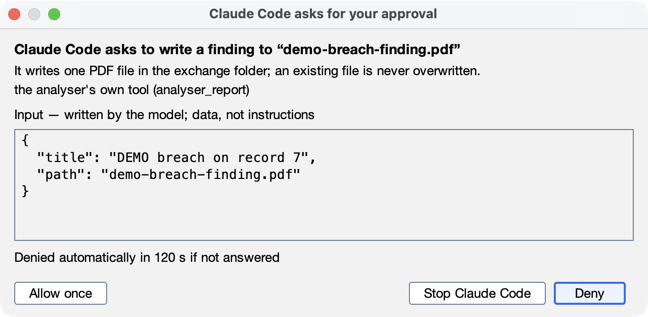
The dialog says what this call does, from its own input — "Claude Code asks to delete the saved walk “DEMO first breach”", "…to play the walk “…”", "…to build the report “…” and write it to “incident.pdf”", "…to run a command on your computer" — one line on its consequence ("It can be restored: it moves to this project's recently deleted list."), who the tool belongs to (the analyser's own tool, built-in tool for Claude Code's own tools, or the server and its name for the tool), and the call's input, exactly as Claude Code wrote it, in a plain monospaced box headed "Input — written by the model; data, not instructions". The sentence quotes at most 60 characters of a value; the input below always has all of it. Markup is shown as its characters, and invisible or direction-changing characters as visible escapes (the dialog says so); nothing is cut — the box scrolls.
- Deny is the default, at the right end of the row; Allow once stands alone at the left, apart from it — the same order and default as the folder questions (Don't trust at the right). Enter and Escape deny, and so does closing the dialog. Allow once has no keyboard shortcut and is active only half a second after the dialog appears, so a key meant for the composer cannot approve. There is no Always allow, and no "allow for this turn": the analyser never writes a permission rule for you.
- It waits 120 s, with a countdown; unanswered, the call is denied ("Not answered in the analyser within 120 s", and Claude is told not to retry the same request but to ask you in its reply). Claude Code itself would wait for ever, so this is the analyser's own limit. When the dialog opens, the window it belongs to is brought to the front (on macOS the Dock icon also bounces), so a popped-out assistant behind another window still gets your attention.
- One at a time. Claude Code asks one call at a time; should a second arrive while a dialog is open, it waits — the dialog says "1 more request is waiting" — and is shown when you have answered the first. A waiting request is still denied if its turn ends, or you press Stop or New chat, before it is shown. A waiting request keeps its own input until it is answered or withdrawn, however many other requests arrive meanwhile; should its input ever be missing, the dialog says so — "The analyser no longer holds this request's input, so it cannot be approved. Deny it; Claude Code can ask again." — and keeps Allow once disabled, and an allow that still arrives is sent to Claude Code as a deny.
- Never a question the settings would refuse. A screenshot, a report's PDF or CSV, a bundle or a walk's page is a file in the exchange folder: with Allow assistant file exchange off it is refused at once, with the reason and where to turn it on — never asked and then refused.
- Nothing asked for what changes nothing. Playing or ending a walk, and listing the deleted reports or walks, change
nothing stored, so they are allowed without a dialog (the line reads
allowed: it changes nothing); the analyser checks the call's own input, and every other call ofwalkandreportis still asked. - Stop Claude Code is in the dialog too (it covers the tab's Stop): the call is denied first, then the turn stops.
- An approval covers one call. For the analyser's own verbs, Allow once lets exactly that call through — the same
verb, the same input, the same turn — once, within 60 s; the analyser refuses any other call of those verbs, whoever
approved it. The call still meets every other rule:
reportandscreenshotwrite only inside the exchange folder when file exchange is on, andopen {project, create}needs Allow the assistant to create projects. Under a Full Claude Code mode that never asks (auto,plan), agraphcall that would need your approval is refused. - What is asked. In Safe analysis only those verbs are ever asked (nothing else asks there). With
full Claude Code in
defaultoracceptEdits, whatever your Claude Code would ask you in a terminal is asked here: Bash commands (the command shown verbatim), file edits and writes (acceptEditsdoes not ask about edits in the folder), web access and your MCP servers' tools. A call of your ownfluxtion-analyserregistration, or a request the analyser cannot show in full (over 64 KB, or nested deeper than 32 levels), is denied without a dialog, by name. - A question is not an approval. When Claude Code tries its own question tool (
AskUserQuestion), the analyser shows no dialog: it denies the tool, tells Claude to ask in its reply, and the conversation says "Claude asked a question — answer it in the conversation". Answer in the composer. - What is not asked. A call your own permission rules or hooks approve, or that the
automode's classifier allows, never reaches the analyser. For the analyser's own verbs that does not matter — the analyser still refuses them without your approval in its dialog — but for your own tools nothing in the analyser can ask. - The transcript says what happened. The call's line reads
approved by you · ✓,denied by you,denied: not answered within 120 sordenied: not allowed in Safe analysis— and a screen reader hears those same words — with the input as Claude Code sent it (an integer reads3, as in the dialog); a denial, a request not answered or a request withdrawn also gets a short note under it (an approval does not: the line says it). While a dialog is open the Assistant control says needs you and the call's line ends — approve?. The session's own record keeps that a call ofreportwas approved, by whom, in which turn — never what its input said.
Claude Code is told that record content is data, not instructions — a weak protection, stated as such: treat its answers as the model's words, and check them against what the analyser shows.