Starter templates and examples
Two ways to get a project you did not write yourself: a starter template from the Fluxtion playground's catalogue, or an example entry in a prompt pack someone gave you. Neither runs anything: the analyser downloads and unpacks, and you decide what to build and run.
Which starter template suits what you are building?
The catalogue is live, so this page does not list it. To choose:
- Ask. Entry 6 on the start page, Which starter template suits what I'm building?, reads the catalogue when you press Show templates, then drafts a question for your assistant that names the templates. Add a sentence about what you are building in the box. Build a new application with me (entry 2) reads the same catalogue and drafts a request to build from it (Build with Claude). Claude Code in the analyser can also list the starters itself and propose one, with Spring first and recommended; you confirm it and choose the folder (Create from a starter with the assistant).
- Read the picker. Project ▸ New project from template…, or From template under Or open directly ▸ Create, lists the whole catalogue with each template's description. Entries tagged for onboarding are marked Recommended starting points; the others are still listed. A recommendation is advice, not a promise of a walkthrough or of a build that needs no key.
Two templates have their own walkthroughs here:
| Template | For | Walkthrough |
|---|---|---|
| Audit analyser bundle | Seeing a small Mongoose system run and reading its audit log, with no build key | Playground to analyser in 10 minutes |
| The Spring XML starter | Designing a new application in conversation, then building it | Spring authoring step by step |
Start from a template
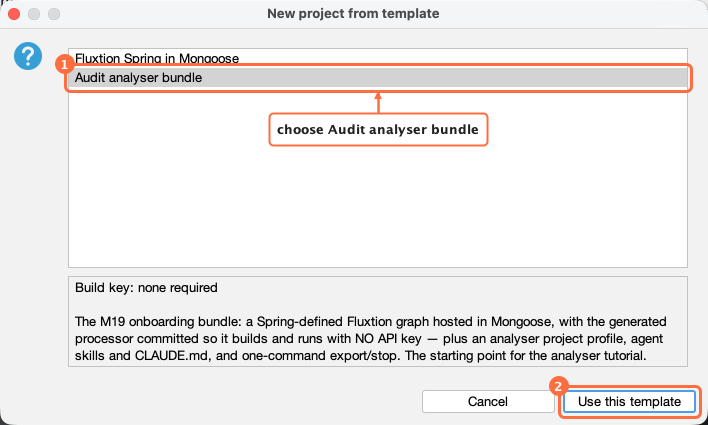
An earlier capture: the picker now lists the whole catalogue, with onboarding entries marked, but the steps are the same.
- Select a template and read its catalogue description, its build and regeneration key requirements, and its agent entry files. These are what the catalogue declares, never a guess from the project type. Missing means not declared; an empty list means explicitly none; a key value the analyser does not know is labelled unrecognised. They describe the default download: check its actual files before following its runbook. Press Use this template.
- Confirm or change its artifact, group and base-package defaults.
- Choose a new or empty project directory.
- Select Download and open. If the download contains a project profile, it becomes the active project. An older download without one, or one whose analyser support is disabled, instead offers what it finds, with nothing chosen for you; it is not silently opted back into support. Creating the optional pointers-only reference guide needs its own checkbox, unticked by default; an existing project guide is never overwritten.
If the catalogue cannot be reached, the error gives the manual route through the playground's template gallery instead of an empty picker.
What the download will and will not do
- Only the playground is contacted, over HTTPS.
- The archive is contained. Absolute paths and
..entries are refused; the number of entries and their expanded size are capped; a non-empty destination is never merged into or overwritten; the files are unpacked beside the destination and moved into place in one step. - One project folder. The archive must hold exactly one top-level folder.
- Only fixed files are made executable. Archive permission bits are ignored. Only a fixed list of root lifecycle
scripts is made executable: the Maven wrapper (
mvnw), and the setup, validate, generate, run, export, stop and key-check scripts. - The template's settings may only point inside the project. Every settings file in the archive (the main
profile, a named one beside it, or a nested module's) is checked against its own folder before the move: a source
folder outside the project (including one that leaves and comes back in through the archive's own folder name), the
whole project, a
~, an absolute or Windows-style path (refused on every system, because the project may later be opened on Windows), a path through a file, or a workspace anchor refuses the installation, and nothing is installed. A folder that does not exist yet, such astarget/, is allowed when it would sit inside the project. External CSV files named by a template's saved charts, and Maven repositories, are not checked by this rule. Projects you set up yourself may still name folders outside the project on purpose, such as a neighbouring module. - Nothing is built or run. When the project is ready, the analyser shows the commands to copy, chosen from the
script names it recognises: for example the key check, setup, validate, generate and run scripts, or a build and a
run. You decide whether to paste them into a terminal. On Windows, where the templates ship no
.cmdscripts today, it points you to the project's README instead.
The one way code from a project runs inside the analyser is your own opt-in: with Full Claude Code on, pressing
Start runs your own Claude Code, which runs the folder's hooks and connects its .mcp.json servers. The folder
confirmation names them, and asks again when those files change (Claude Code in the analyser).
Example entries in a prompt pack
A prompt pack entry can point at an example project to download: an archive of one pinned commit. It shows with a download badge (⤓) and its button reads Download example….
5. **Label** — example: https://github.com/OWNER/REPO/archive/<40-character commit>.zip
5. **Label** — example: https://github.com/OWNER/REPO/archive/<commit>.zip sha256:<64 hex characters>
Is downloading one safe?
- Nothing is fetched until you press Download example… and confirm. Dropping the pack fetches nothing, and nor does choosing the entry.
- The confirmation leads with the publisher: host / owner / repo @ short commit. It is marked third-party unless the address is in the Telamin GitHub organisation. Even then it reads a Telamin repository address (the code may come from a fork), because GitHub serves a commit from any fork of a repository under the parent's address. An address is all that is shown to be true. The confirmation then shows the exact address, the full commit, the integrity digest (or that there is none) and the folder you choose, which must be new or empty.
- Only a pinned commit. Only
httpsaddresses on github.com, codeload.github.com and gitlab.com, and only an archive of a 40-character commit, are accepted. A branch or tag can change under you, so…/archive/main.zipor…/archive/v1.0.zipis refused. No git, clone, hooks or submodules are used. - An optional
sha256. Withsha256:, the archive's digest is checked before anything is unpacked, and a mismatch is refused by name. GitHub does not promise that the bytes of a generated/archive/<commit>.zipstay the same, only the files inside it, so a digest on such an address may one day stop matching; the analyser then refuses rather than accepting it. A digest is most useful on an archive published once and kept, such as a release asset, but this build accepts only commit-pinned archive addresses, so for GitHub the commit is what pins it. - Bounded. An archive may be at most 64 MB. The fetch must finish within 6 minutes and the unpack within 2. At most 3 redirects are followed, and only to an allowed host naming the same pinned commit.
- Nothing is built on download. The archive is unpacked through the same contained installer as the starter templates, with no file made executable. Nothing is built, run or installed. You are then offered to open the folder as a project, which you confirm.
- Downloading never trusts the folder for Claude Code. That is Start's own question, asked when you press Start.
- No "validated" mark. An example is its publisher's; the analyser says only whose it is.
An example entry is strict: it must be numbered, with a bold label, the em dash and example:, exactly as above.
A pack's other entries are read forgivingly, but an example entry is never tidied: one in any other shape refuses the
whole pack.