Set up a project with Claude
Set up a project with Claude… (in the assistant panel in its Claude Code mode, and the start page's Set up a project from my code) asks
you for your code's folder — the same folder checks as Start: not your home folder, a credential folder or a
bundle's working copy. That folder becomes the session's working folder for this run (it is not remembered, and is not
a project), and Start is armed with a set-up question. Claude reads the folder with its read-only tools and the
analyser's verbs, then calls propose with up to ten items — a source root, the processor, a GraphML, a runbook,
a log to open — each with its reason.
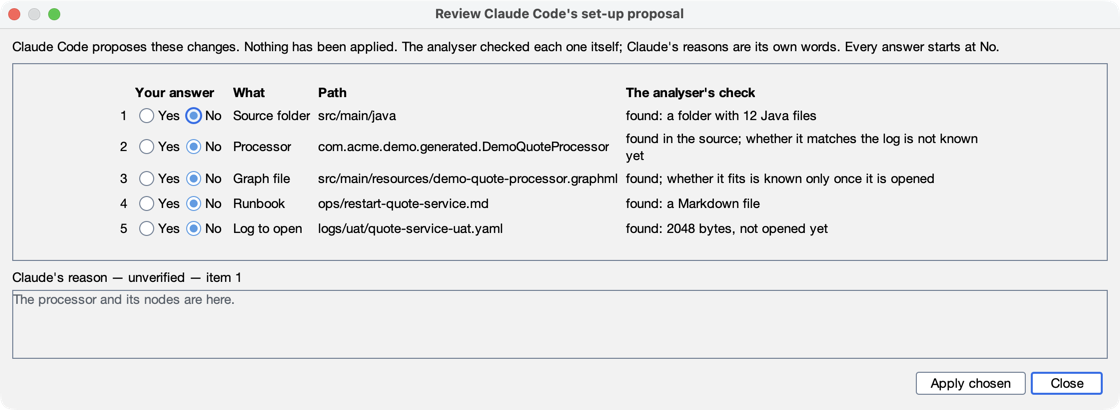
- Nothing is applied by Claude. A banner appears on the tab — "Claude Code proposes 4 changes to set up …/medmon. Nothing has been applied — review each one." — with Review… and Not now. A model never opens a dialog: the review opens when you click.
- The analyser checks every item itself before the banner shows (read-only): the folder exists and how many
.javafiles it holds, the processor's class is found in the sources, the GraphML and log are readable files, the runbook is Markdown. The review shows, per item, your answer (the column after the number, so the Yes / No stays in view at the dialog's default width), the kind, the path (a long one shortened, the whole of it in the tooltip) and the analyser's check, wrapped in its own column; Claude's reason is in its own box, labelled Claude's reason — unverified. An item outside the set-up folder (after following links) is shown and can never be applied; an item that does not exist, or is the wrong kind of file, is refused with why. - Every answer starts at No. When the folder has no project, the first row is the analyser's own: create a project, checked as "the analyser's own offer: an empty project here (New project…)". The items that need a project wait for it. Apply chosen applies your Yes items one at a time, in a fixed order — create, source roots, processor, runbooks, GraphML, log — each through the same path you would use yourself, and then shows the analyser's pairing check. Creating the project is never treated as a project switch: the session keeps running, and New chat starts one in the project.
- One proposal at a time. A second
proposewhile one waits for you is refused ("a proposal is already waiting for the person; call context to see its outcome"). Claude sees each item's outcome inanalyser_context(proposals: ids, kinds, states and the analyser's checks — never its own reasons back). A "proposal" written in an answer's text does nothing: only the verb counts. An external MCP client callingproposeis told it is an unknown verb.
After the set-up
The project now names its source roots, processor and graph, so the analyser can pair a log with its graph and lead a log line to its source. Two next steps:
- Record a run and open its log. Ask Claude what it shows, or check your acceptance criteria against it (Check your criteria against the evidence).
- Building or changing the code needs an assistant that can edit files and run commands: Full Claude Code, or a client in your terminal (Build with Claude ▸ Who does what). In Safe analysis Claude can propose the set-up, but can do neither.