Settings reference¶
Project ▸ Settings… opens one dialog with its tabs down the left side. Sources ▸ Source roots…, Sources ▸ Event processor… and Sources ▸ Maven repos… open it at that tab, and the Project panel's Settings… buttons at the tab their row is about. This page lists every tab and control, its default, and where the setting is kept:
- Project: kept in the open project's profile,
<project>/.analyser/project.fluxtion-settings, which you can commit and share. With no project open, these tabs edit your own defaults instead. - Machine: kept in
~/.fluxtion-analyser/config, for this user on this machine only. A project never carries it.
Projects, profiles and sharing has the tiers in full, and What is stored where, what leaves the files.
Source roots (project)¶
The folders that hold your processor's and nodes' Java source. With them, a log line or a node leads to the method that wrote it, and the assistant can read real source (Source navigation).
- Add… a Java source root (the folder that directly contains your top-level packages, such as
…/src/main/java) or a project folder: the analyser finds itssrc/main/java, including sub-modules. You can also drag folders in. A root that does not look like Java source is shown in red. - Source roots also authorise reading the Spring XML design and the producer results under them.
- Workspace anchor (with a project open): how far above the project your sibling checkouts live. A root in a sibling checkout is then stored relative to the project, so the profile works on a colleague's machine. It is a depth, not a location: nothing above the anchor is ever written into the profile.
Maven repos (project)¶
Local Maven repositories searched for *-sources.jar when a class is not under a source root, so third-party node
sources resolve too. The default is ~/.m2/repository. Tick Don't search local Maven repositories to stop.
Event processor (project)¶
The fully qualified class names of your EventProcessors. The active one maps each instanceId in the log to a
source file and scrolls the Source view to the handler that ran. It is inferred when a log opens; Set active
overrides it.
LLM (machine)¶
The in-app assistant's provider, used only by the In-app assistant profile (Assistant profiles):
| Control | Default | Notes |
|---|---|---|
| Provider | anthropic |
anthropic or openai |
| Model | empty | the model id |
| API key | empty | stored in cleartext in ~/.fluxtion-analyser/config, and sent only to the provider's endpoint. Never in an exported settings file, a project or a bundle |
| Base URL (optional) | empty | a proxy or a compatible endpoint |
The Fluxtion build key is a different key, for regenerating a processor. It lives in ~/.fluxtion/fluxtion.apiKeyFile,
managed from AI ▸ Fluxtion API key…, and is not an analyser setting.
Performance & S3 (machine)¶
| Control | Default | Notes |
|---|---|---|
| Memory threshold (MB) | 500 | A log at or below it loads into memory; a larger one is memory-mapped. 0 always memory-maps. Applies to the next file opened |
| AWS profile (optional), AWS region (optional) | empty | Used by Audit log ▸ Open log from S3…, which runs your local aws tool |
Assistant (machine), by profile¶
Every option Set up AI and the quick switch set is on this tab, grouped by the profile it belongs to. All of them are this machine's and this user's only, never in a project profile or an evidence bundle, except Exchange folder (this project), which the open project stores; and an administrator cannot lock them yet (Managed policy). Only the two limits marked † below can be shared: a settings file exported with its Assistant limits category carries them, and never an access switch. An import that finds a switch says it was ignored (Projects, profiles and sharing).
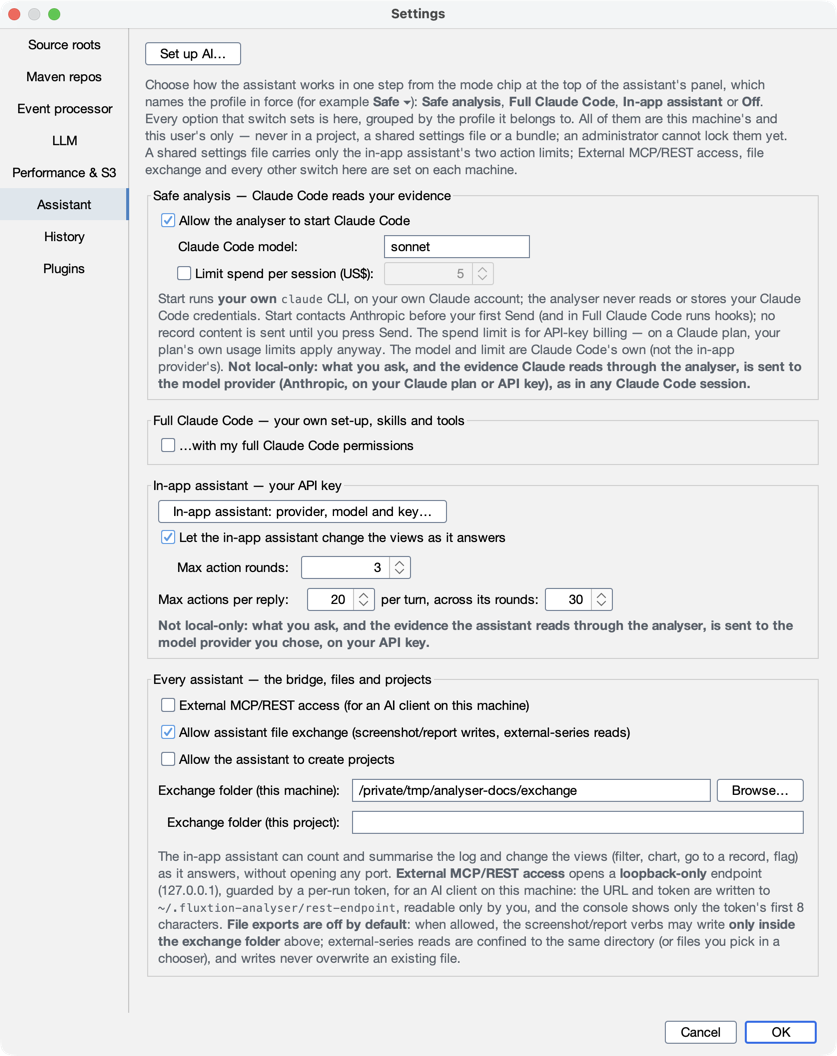
Safe analysis: Claude Code reads your evidence¶
| Control | Default | What it does |
|---|---|---|
| Allow the analyser to start Claude Code | off | Lets the assistant panel's Start Claude Code run your own installed, logged-in claude, as Safe analysis (Claude Code in the analyser) |
| Claude Code model | sonnet |
Claude Code's own model, not the in-app provider's |
| Limit spend per session (US$) | off (5.00 when on) | For API-key billing: the analyser stops Claude Code when the session has spent this much. On a Claude plan, the plan's own limits apply |
Full Claude Code: your own set-up, skills and tools¶
| Control | Default | What it does |
|---|---|---|
| …with my full Claude Code permissions | off | Runs your own Claude Code in the panel, with your settings, skills, hooks, MCP servers and tools. Needs the Safe analysis switch. Turning it on shows a warning first, with Cancel as the default |
| Mode | default |
default, acceptEdits, auto or plan. bypassPermissions is never offered |
In-app assistant: your API key¶
| Control | Default | What it does |
|---|---|---|
| In-app assistant: provider, model and key… | — | Opens the LLM tab |
| Let the in-app assistant change the views as it answers | on | Lets it filter, chart, go to a record and flag as it answers. The Ask questions need it |
| Max action rounds † | 3 | How many rounds of actions one answer may take |
| Max actions per reply † | 20 | Actions in one reply |
| …per turn, across its rounds | 30 | The budget for one question; when it is spent the turn ends and says so |
Every assistant: the bridge, files and projects¶
| Control | Default | What it does |
|---|---|---|
| Set up AI… (at the top of the page) | — | The step-by-step way to set up Claude inside the analyser or your own AI client; the Connect an AI client… button that was here is behind Set up AI's More options… (Connect your client) |
| External MCP/REST access (for an AI client on this machine) | off | Asks first when turned on (on save). Opens the loopback-only endpoint an outside client uses, with a per-run token. --rest turns it on and it stays on (External access) |
| Allow assistant file exchange (screenshot/report writes, external-series reads) | off | Lets an assistant write screenshots, PDFs, CSVs, reels and bundles, and read external CSV series, only inside the exchange folder, and never over an existing file |
| Allow the assistant to create projects | off | Lets an assistant create a project with open {project, create}, never over an existing one. Project ▸ New project… is never gated by it |
| Exchange folder (this machine) | empty | Where file exchange reads and writes. Empty means no folder, so nothing is written |
| Exchange folder (this project) | empty | A project-relative folder the open project prefers, stored in the project. No .., no absolute path; empty means the machine's folder |
† Carried by an exported settings file's Assistant limits category, the only settings on this tab that travel; see above.
History (machine)¶
Buttons that clear, at once: Clear search history, Clear saved graphs, Clear recent files, Reset topology view (the Topology tab's zoom, pan, orientation, spacing and label size), and Clear all for the four.
Plugins (machine)¶
Log-source reader plugins, and the readers installed. A plugin is a jar you place in ~/.fluxtion-analyser/plugins;
installing one is running arbitrary code, so install only jars you trust. Nothing is downloaded; add or remove jars
and restart (Log-source plugins).
Elsewhere¶
- Theme: Light, Dark, IntelliJ or Darcula, from the Theme menu (machine).
- The assistant profile: Set up AI… and the mode chip's quick switch (Safe ▾, ◆ Full ▾ …) in the assistant panel write the same switches as this tab (Assistant profiles).
- The Fluxtion build key: AI ▸ Fluxtion API key….
- The compiler account: AI ▸ Compiler account…. Its service address is a machine setting
(
compilerServiceUrl, empty by default); its credential is not a setting and is kept in the OS credential store (Connect a compiler account).