Runbooks, glossary and saved analyses — how an AI uses them
A project profile carries three things an AI acts on: runbook pointers, a glossary pointer and saved analyses (Portable context). This page is the operating manual for the AI side: how the in-app assistant or an LLM connected over MCP finds them, uses them, and creates or updates them — and the one thing it never does.
flowchart LR
  R["Repository<br/>ops/restart.md · docs/glossary.md<br/>.analyser/project.fluxtion-settings (pointers)"] -->|"opened as a project"| AN["Analyser<br/>serves the POINTERS in context<br/>never opens or runs a runbook"]
  AN -->|"MCP: analyser_context<br/>runbooks · vocabulary · analyses"| AI["AI agent"]
  R -->|"reads the file itself"| AI
  AI -->|"acts with its own tools /<br/>the deployment side's MCP"| M["Deployed app<br/>on Mongoose"]
  AI -->|"writes a new runbook + pointer,<br/>shows the diff"| R
  H["Human<br/>reviews the diff, approves the commit"] --- R
  classDef here fill:#ff5722,stroke:#bf360c,color:#fff;
  class AN here;
The rule that shapes everything here
anything in a profile that an agent will act on must be inert, or a pointer to something under version control — never an instruction the profile itself carries.
So the analyser stores where a runbook is (ops/deploy.md), never what it says; it never executes
one and never hands its contents to an agent — the pointer is all context carries. (A person can read
the file in the app: Open on the Project panel row is a read-only viewer. That is a human surface, not a
channel.) The AI does the reading and the doing, with its own tools and its own permissions, from the
repository it has cloned. That is also why there is deliberately no action-socket
verb to write a runbook: an agent that could both record a pointer and act on it is a loop with no human
in it. The pointer lives in a committed file, so it goes through the same review as the runbook.
Finding them — context
Both agents read the same payload: the in-app assistant through its own actions (Let the in-app assistant change the views as it answers), an external LLM
through analyser_context. With a project open it carries:
"runbooks": [
  {"name": "deploy",  "path": "ops/deploy.md",  "resolved": "/work/quote/ops/deploy.md",  "exists": true,  "from": "project",
   "note": "a pointer — read the file from the repository; the analyser stores no instructions and executes nothing"},
  {"name": "restart", "path": "ops/restart.md", "resolved": "/work/quote/ops/restart.md", "exists": false, "from": "project", "note": "…"}
],
"vocabulary": {"path": "docs/glossary.md", "exists": true, "text": "# Glossary\n- **live**: …", "from": "project"},
"analyses":   [{"name": "spread breach", "rationale": "…", "parameters": [{"name": "log"}], "steps": ["open", "filter", "graph"]}]
An agent that only needs these can ask for context {sections: ["project"]}: the project section carries
all of the portable context, exactly as the full payload does, and skips the reads behind the rest.
exists: false is a fact, not a failure: the profile points at a file this checkout does not have. An
agent should say so rather than guess at the contents. The Project panel shows the same rows to the
person — a warning where the file is missing — so both parties are looking at one set of facts.
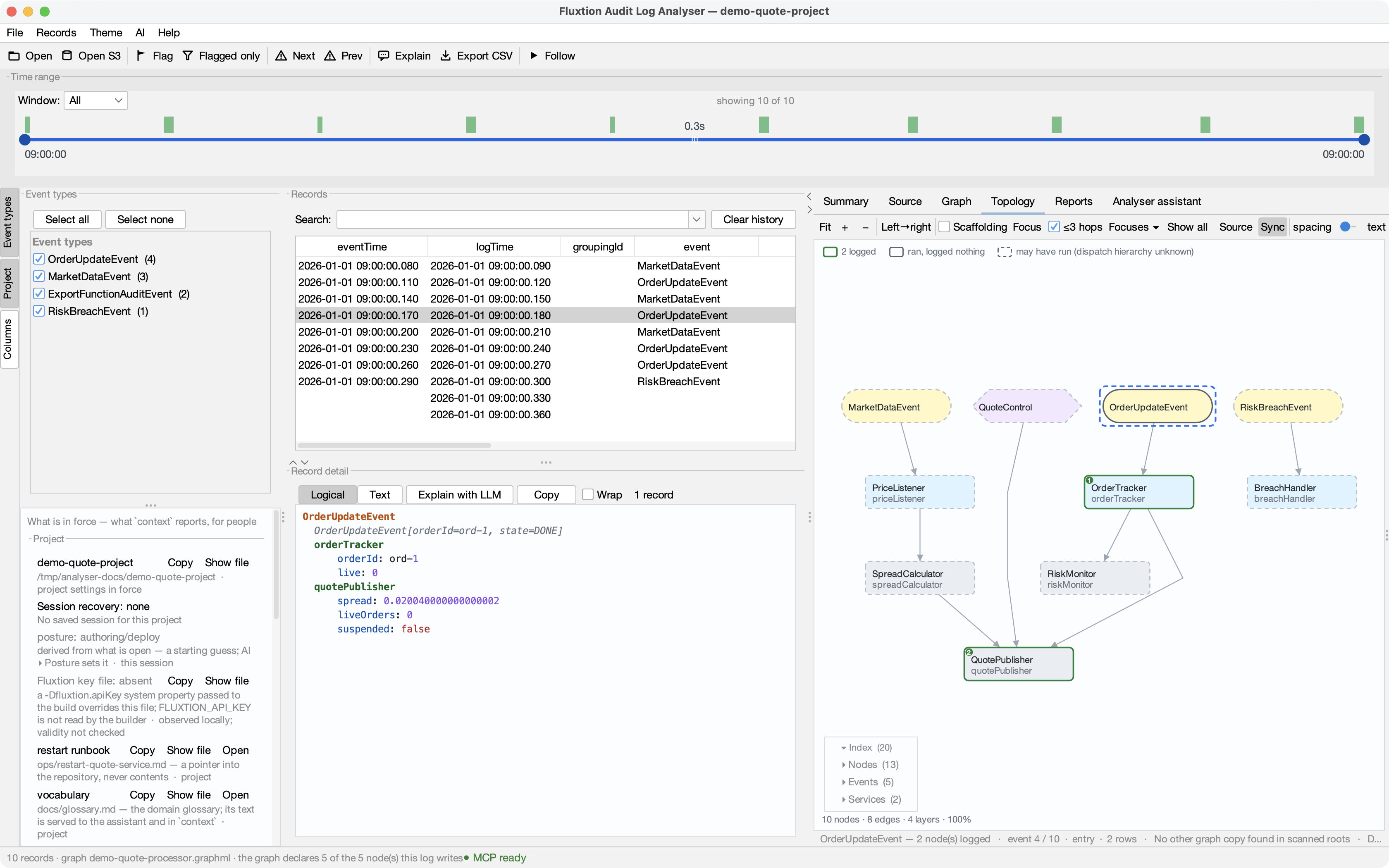
What the conversation looks like — LLM → MCP → analyser
The same facts, from the agent's side. This is a real shape, on the demo project: the client discovers
one tool per verb, the agent calls analyser_context first, and everything after that is the agent
deciding what to read and what to run.
You: The quote service looked wrong around 09:00. Use the fluxtion-analyser tools. Tell me what happened, and if there is a restart runbook, what we would do next — but don't run anything.
→ analyser_context {}
← { "project": {"name": "demo-quote-project", "root": "…/demo-quote-project"},
    "log": {"openedFrom": "…/demo-quote-audit.yaml", "records": 10, "openedBy": "you"},
    "graphPairing": {"graph": "demo-quote-processor.graphml", "applies": true, "auditLogging": "enabled"},
    "runbooks": [{"name": "restart", "path": "ops/restart-quote-service.md", "exists": true, "from": "project",
                  "note": "a pointer — read the file from the repository; the analyser stores no instructions and executes nothing"}],
    "vocabulary": {"path": "docs/glossary.md", "exists": true, "text": "# Glossary\n- **live**: …\n- **spread**: … 0.01 is normal here\n- **breach**: …"},
    "analyses": [{"name": "spread breach", "rationale": "every breach incident starts the same way: the spread before it",
                  "parameters": [{"name": "log"}], "steps": ["open", "graph"]}] }
While a log is still loading, context says so instead of a verdict — inFlight is present and the pairing is
pending; neither appears once the load has landed:
← { "graphPairing": {"graph": "demo-quote-processor.graphml", "pairing": "pending — a log is loading; …", "loading": true},
    "inFlight": "opening …/next.yaml", … }
The agent now knows three things it did not have to guess: what spread and breach mean here,
that there is a saved analysis for exactly this kind of incident, and that a restart runbook exists.
→ analyser_open {"analysis": "spread breach", "bind": {"log": "…/demo-quote-audit.yaml"}}
← { "analysis": "spread breach", "completed": "2/2 steps",
    "steps": [{"step": 1, "action": "open", "ok": true}, {"step": 2, "action": "graph", "ok": true}] }

→ analyser_read {"recordIndex": 7}
← { "event": "RiskBreachEvent", "nodeLogs": {"breachHandler": {"breachedOn": "ord-2", "liveOrders": 2, "breachesToday": 1}} }
Then — with its own file tool, not the analyser — it reads ops/restart-quote-service.md, because the
analyser handed it the path and nothing else.
Agent: At 09:00:00.300 the risk limit was breached on
ord-2with two live orders — a breach in this system's vocabulary is the RiskBreachEvent that follows liveOrders exceeding the limit, and the glossary says it's routine, not an outage. I ran the saved spread breach analysis; the chart ofquotePublisher.spreadis in your Graph tab — it widened from 0.011 to 0.020 in the two cycles before the breach, so the spread moved first. Therestartrunbook says: confirmliveOrdersreads 0 before restarting, restart through the deployment tool, then verify the next log opens with a MarketDataEvent within 5 s and spread back near 0.01. I have not run anything.
Every claim in that answer has a source the person can check: the record is in the table, the chart is on
the Graph tab, the glossary and the runbook are files in the repository, and context said which of them
the project declares.
sequenceDiagram
  participant H as Human
  participant AI as AI agent
  participant AN as Analyser (MCP)
  participant R as Repository
  H->>AI: what happened; what would we do next?
  AI->>AN: analyser_context
  AN-->>AI: runbooks (pointers), vocabulary (text), analyses (offer)
  AI->>AN: analyser_open {analysis, bind}
  AN-->>AI: 2/2 steps — chart drawn for the human
  AI->>R: read ops/restart-quote-service.md (own file tool)
  AI-->>H: answer, every claim pointing at something on screen or in the repo
  Note over AN: never opens, renders or runs a runbook
Using a runbook
- Read
context.runbooks; pick the pointer by name. - Read the file yourself —
resolvedis the path on this machine — with your file tools. - Do what it says with your own tools or through the deployment side's own MCP surface. Nothing in the analyser will do it for you, by design (the analyser gains no server-side code; see Build with Claude).
A prompt that uses this well:
Read
context. If adeployrunbook exists, read it and tell me the steps we would take to roll back the change in this log's time range. Do not run anything.
Using the glossary
The glossary is the one pointed-at file whose contents the analyser reads — a glossary is read, a
runbook is acted on. The in-app assistant gets its text first in every question it is asked (Ask), framed as
reference text (not an instruction), so live is read the way this system means it. An external LLM
gets the same text as context.vocabulary.text, capped at 16 000 characters with truncation announced.
An agent that does not use the built-in prompt should put it first too.
Using a saved analysis
context.analyses is the offer. To run one:
Steps run through the action socket in order and stop at the first failure; the echo reports each step and, if it stopped, how many did not run and that the earlier ones have changed the view. A parameter with no value and no default refuses the run and names itself.
Creating or updating one — write the files, not the socket
An agent creates a runbook the way a person does, because the profile is a committed file:
- Write the runbook itself into the repository —
ops/restart.md— with your file tools. - Add the pointer to
.analyser/project.fluxtion-settings: The path must be project-relative, no.., no spaces or shell characters — anything else is refused when the project is next opened, with the reason in the status bar, and the entry is dropped. - Commit both. The analyser reloads the profile when the project is (re)opened —
open {project: …}over the socket does it — and the Project panel gains the row.
The same steps create a glossary (vocabulary=docs/glossary.md) or a saved analysis (analysis.N.*,
whose steps must be analyser verbs with project-relative paths or declared {parameters} — see the
Portable context guide for the full gate). A prompt that does this well:
We just walked through restarting the quote service by hand. Write that up as
ops/restart.md, add arestartrunbook pointer to the project profile, and show me the diff before you commit.
The human review step — show me the diff — is the point. The pointer and the runbook arrive together, through version control, and the person who approves the commit is the person the rule protects.
Managing pointers from the app
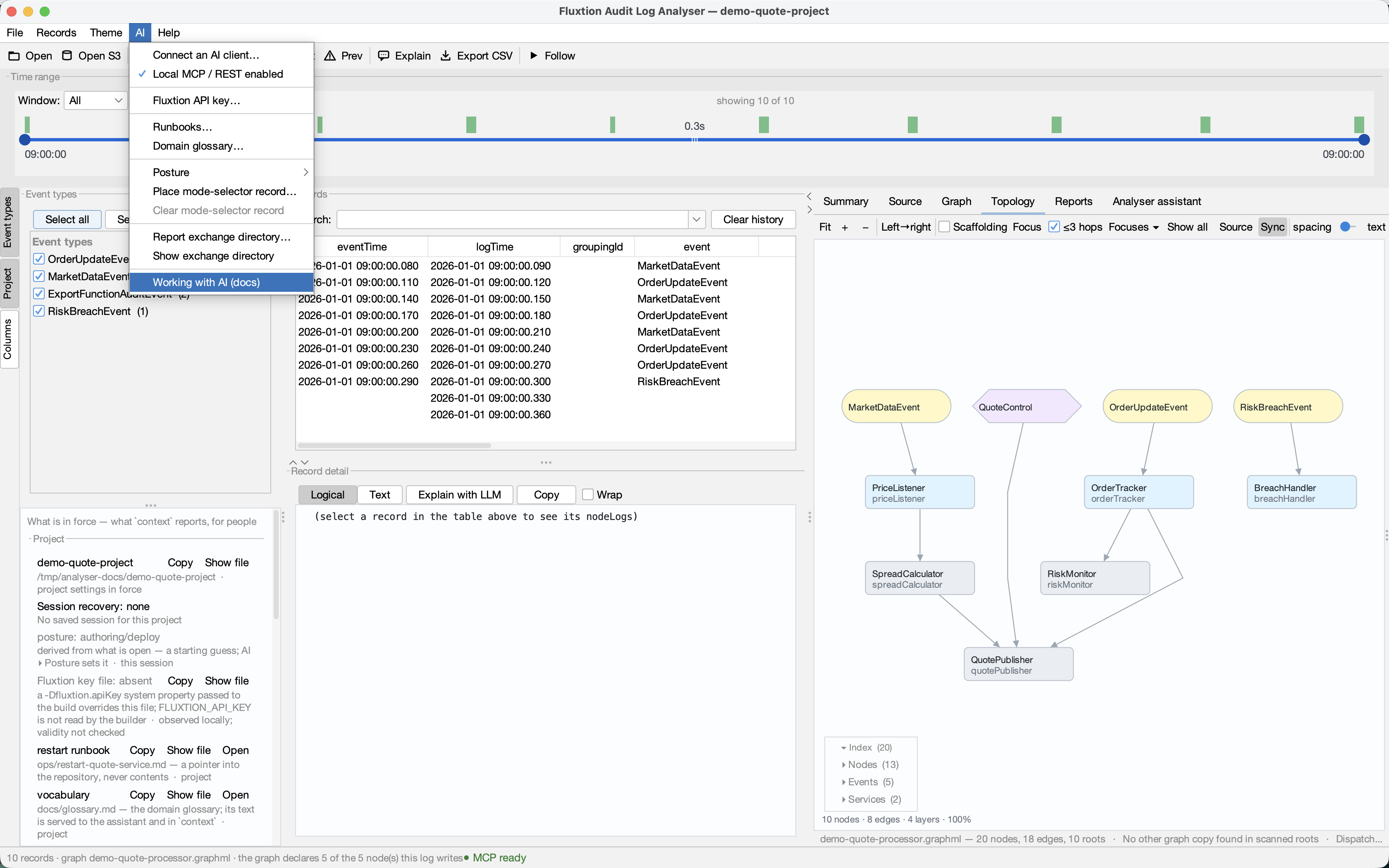
AI ▸ Runbooks… and AI ▸ Domain glossary… add and remove the pointers a project declares, so you no longer have to hand-edit the profile. They store a location and, for a runbook, one line saying when to use it — never the file's contents, and the analyser still runs nothing.
Both items need an open project and say so in their tooltip when there isn't one: pointers are portable
context, and their value is that they travel to a colleague's checkout, so they belong to the project
rather than to your own settings. Every path goes through the same gate the profile loader uses — an
absolute path, a .. escape, a URL or anything shaped like a command is refused with the reason shown
in the dialog.
Finding the skills you already have
Add runbook… lets you point at any file. Find skills… does the looking for you: it scans the
project for SKILL.md files, shows what each would be called, and marks the ones already declared rather
than hiding them — a file you can see on disk but not in the list sends you hunting for a bug that isn't
there.
Nothing is added by finding it. Pick one and you land in the same Add dialog a hand-typed pointer goes through, with the name and description filled in for you to confirm or change. The scan stays inside the project, skips build output and vendored trees, is depth- and count-limited, and says so when it stops early — a project root can be a monorepo.
The description, and where it comes from
A runbook's description is the line an AI client chooses by: with it, a model can tell which of six
runbooks is relevant without opening any of them. It appears in context.runbooks[] and on the Project
panel row.
When you point Add runbook… at a skill-shaped file, its frontmatter prefills the name and description — but only fields you have left empty, and what gets stored is whatever is in the boxes when you press OK. The analyser never re-reads the file to answer questions about it. That is deliberate: if the served description came from the file, editing the file would silently change what the analyser reports about your project, with nobody having declared it. The file suggests; you declare.
What this session is for — work mode, and the mode-selector record
Two more items on the AI menu are not pointers. They are session state that you and the AI client both
see — the client reads them in context.handoff, you read them as rows in the
Project panel — and either of you can set them.
AI ▸ Work mode. An assistant works differently when you are investigating a system than when you are
building one, and that intent changes before any file does ("let's build something new"). The work mode
says which: Investigate or Build. Left on Guess from what is open, the analyser guesses — a project
open reads as Build, otherwise Investigate — and says it is only a guess. Pick one to set it. A client sets
it with open {posture: "authoring"} and reads it as context.handoff.posture (research or authoring;
shown as Work mode in the app). The Project panel names who set it and, when the two disagree, what the guess
would have been.
AI ▸ Place mode-selector record… The authoring mode selector is a small tool, run outside the
analyser before any authoring starts. It decides whether the components you need already exist in a catalogue
or must be written, and which authoring mode applies to each output — which in turn decides the wiring rules
and skills an assistant should load. Its --json output is a record: the branch, the modes in force, the
figures the catalogue already resolved, and what is left to author. This item reads that file and places the
record on the canvas; a client does the same with open {record: {…}}. The analyser never runs the
selector and does not check the record — it carries it, attributed to whoever placed it. A malformed file is
refused whole, with the reason. AI ▸ Clear mode-selector record removes it; a client uses
open {close: "handoff"}, which also returns the work mode to Guess from what is open.
Both belong to the session: a project switch clears them, and nothing is written to the project profile. If you are not authoring a processor with an assistant, you can ignore both.
Is an AI client reaching this window?
The status bar carries a light that answers exactly that: MCP ready means this window is serving, and MCP elsewhere means another analyser window owns the endpoint, so a client is reading that window's log. Troubleshooting ▸ Which window is serving has every state.
Ready is not connected. This window being reachable and a client actually talking to it are two different facts: the first is true continuously, the second only at the moment you measure it. If you want the second, AI ▸ Set up AI… ▸ Your own AI client says when a client with this window's key reached it (and its Check connection runs a bridge probe and says what it found).
Write runbooks in the skill shape
A runbook file is ordinary markdown, and the analyser only ever needs its path — but write it in the shape
an AI harness already knows how to load as a skill: a frontmatter block with name and description,
then the steps.
---
name: restart-quote-service
description: Restart the quote service after a config change; when to use, what to check first, how to verify.
---
1. …
Two things follow. A runbook pointer can target a skill file directly — runbook.0.path=.claude/skills/restart/SKILL.md
— so one file is both the team's runbook and a Claude Code skill, and any harness that reads that shape gets
it too. And the description is what lets a model decide which runbook is relevant before opening any
of them; it is surfaced in context.runbooks[] as runbook.N.description
(The description, and where it comes from). The analyser reads the frontmatter only to prefill the
Add dialog; what it stores and serves is what you confirm. The convention just makes the two worlds the same file.
What the analyser will refuse
- a runbook or glossary path that is absolute, uses
.., is a URL, or looks like a command - an analysis step that is not an analyser verb, opens or closes a project, or names a path outside the project
- a report destination shaped like a credential (a webhook URL is one)
Each refusal names the reason and is announced when the project opens; the sound entries beside it still load. Nothing degrades silently.